GhostChat Pro
Military-grade encrypted P2P messaging, HD video conferencing, and private voice calls. Zero servers. Zero tracking.
Join Room
Have a code? Enter it below.
How FinlyZone Architecture Works
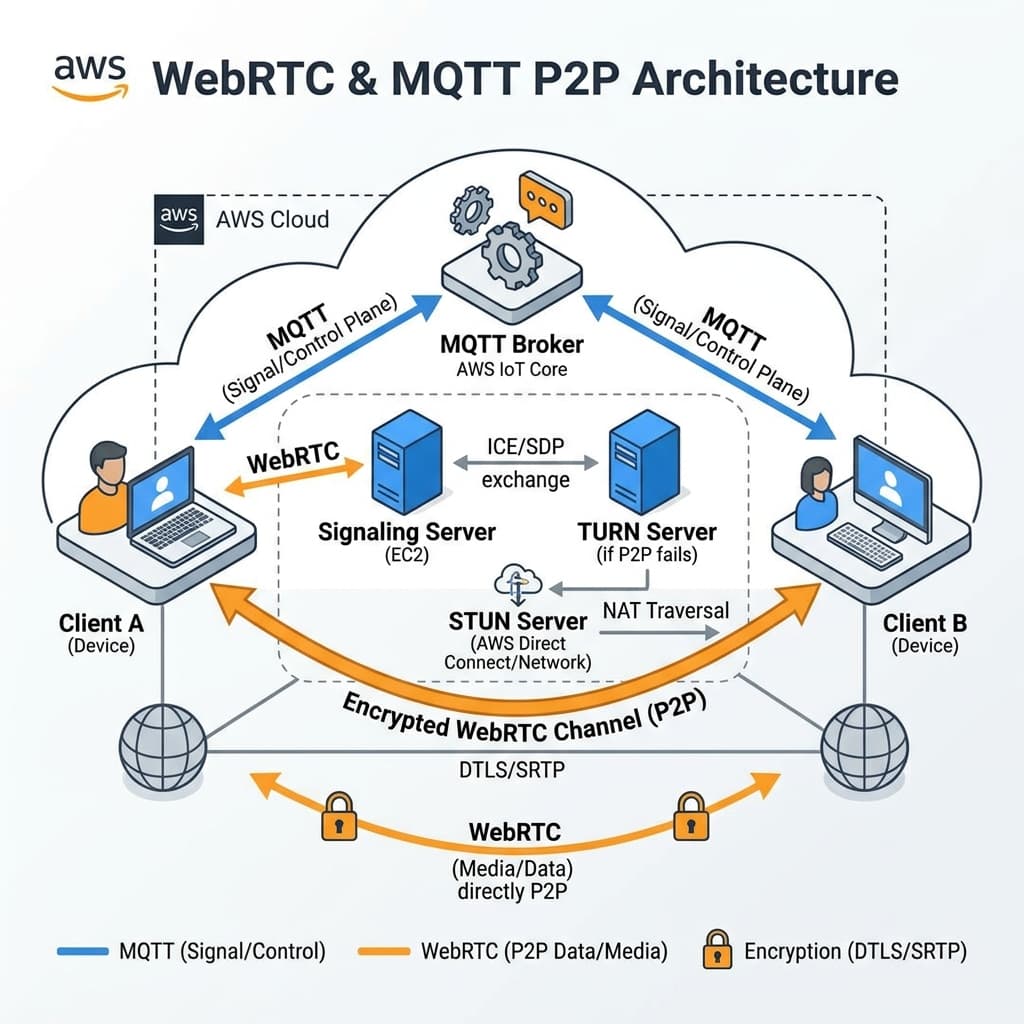
FinlyZone's GhostChat is built on a Zero-Knowledge, Peer-to-Peer (P2P) architecture. Unlike traditional applications that store your data on centralized databases, FinlyZone acts purely as a stateless relay. Your data never touches our disks.
MQTT Signaling
When you create a room, you connect to a lightweight MQTT broker. This broker acts as a stateless switchboard, instantly routing encrypted signals between peers to establish the connection.
WebRTC Mesh
For high-bandwidth data like Video Calls and Screen Sharing, FinlyZone upgrades the connection to a WebRTC mesh network. Video streams directly from your camera to the recipient's screen.
AES-GCM Encryption
Every message, file, and whiteboard stroke is locally encrypted in your browser using the Web Crypto API before being transmitted. Only users with the exact room URL can decrypt the data.
What is GhostChat?
GhostChat is a zero-knowledge communication tool that lets you create instant, disposable chat rooms with high-fidelity video calling built right in. It is designed for maximum privacy, requiring no signups, no phone numbers, and no app downloads.
How GhostChat Works
- Instant Room Creation: Click 'Create Room' to instantly generate a secure, random 6-character room code.
- Peer-to-Peer Connection: When someone joins your room, your browsers establish a direct WebRTC tunnel. The messages flow directly between you and them.
- Military-Grade Encryption: Every text message and image is encrypted client-side using AES-256-GCM before transmission.
- Secure Video Calling: Click the Video Call icon to instantly start an encrypted HD video or voice call.
- Ephemeral by Design: Since nothing is saved on our servers, closing the browser tab permanently destroys the chat history.
Why Use GhostChat?
- Protect Sensitive Conversations: Discuss confidential business deals, legal matters, or personal issues without fear of data breaches.
- No Digital Footprint: Stop leaving chat logs and video call records on corporate servers (like Zoom, Teams, or Slack).
- Cross-Border Security: GhostChat uses encrypted TURN relays to establish secure connections even across strict corporate firewalls and international networks.
- Frictionless Invites: Just copy the URL and send it. The recipient clicks the link and is instantly in the room.
Frequently Asked Questions
Do I need to download anything for video calls?
No. The video and voice calling functionality is built directly into modern web browsers (Chrome, Safari, Firefox, Edge). It works instantly on both desktop and mobile.
Can Finly record my video calls?
Absolutely not. We do not have access to the video streams. The WebRTC standard forces end-to-end encryption for all media streams, meaning even our relay servers cannot decrypt or record your calls.
Explore More Privacy Tools
Need to share files securely or send self-destructing notes?